Copilot vs ChatGPT
To compare Microsoft Copilot and ChatGPT at a glance, the table below highlights their main features, strengths, and limitations. This provides a quick overview before exploring each tool in more detail.
| Feature | Microsoft Copilot | ChatGPT |
| Primary Function | AI assistant integrated with Microsoft 365 | AI conversational chatbot |
| Best For | Workplace productivity, document creation, and email drafting | Creative writing, research, and general knowledge queries |
| Accessibility | Built into Microsoft apps | Web interface, API access |
| Strengths | Easy integration with Office tools | Broad knowledge base, conversational responses |
| Limitations | Limited outside the Microsoft ecosystem | Not connected to live data, dependent on prompts |
What is Microsoft Copilot?
Microsoft Copilot is an AI assistant built into Microsoft 365 applications. It uses large language models to help users create documents, spreadsheets, presentations, and emails. Copilot is designed to support productivity by assisting with repetitive tasks, summarising information, and drafting content directly within familiar Microsoft tools.
What is Microsoft Copilot Used For?
Copilot can draft documents in Word, generate data insights in Excel, and summarise emails or Teams messages. It also offers suggestions for presentations in PowerPoint. The tool is most useful for users who spend a lot of time working in Microsoft 365, helping them reduce manual effort while staying within their workflow.
Pros and Cons of Microsoft Copilot
Microsoft Copilot offers many advantages for productivity, but it also has some limitations to be aware of.
Pros
- Integrates with Microsoft Office applications
- Generates draft content quickly
- Summarises complex documents and emails
Cons
- Limited functionality outside the Microsoft ecosystem
- Responses require human verification
- Some features are only available with certain subscription levels
What is ChatGPT?
ChatGPT is an AI language model developed by OpenAI. It can converse with users, generate text, answer questions, and provide information across a wide range of topics. Unlike Copilot, ChatGPT operates independently of specific software applications and can be accessed through web browsers or APIs.
What is ChatGPT Used For?
ChatGPT can help with writing tasks, research, brainstorming, coding, and answering questions. Its strength lies in producing context-aware, conversational responses, making it useful for both professional and creative projects.
Pros and Cons of ChatGPT
ChatGPT is a flexible AI tool, but it comes with strengths and limitations. Below, we highlight its main pros and cons for easy comparison.
Pros
- Broad knowledge base across multiple domains
- Flexible applications from creative writing to coding
- Accessible through multiple platforms
Cons
- Not connected to live data
- Responses may be incorrect or misleading
- Requires precise prompts for complex tasks
What’s the Difference between Microsoft Copilot and ChatGPT?
The main difference between Microsoft Copilot and ChatGPT is that Copilot is designed for in-app productivity tasks, while ChatGPT offers more creative flexibility and conversational depth.
The table below further highlights both the similarities and differences to help users understand how each tool functions and what sets them apart.
| Similarities | Differences |
| Large language models power both | Copilot is embedded in Microsoft applications, while ChatGPT operates independently |
| Both can generate text and assist with content creation | Copilot focuses on productivity tasks; ChatGPT has a wider range of conversational abilities |
| Both need human oversight to ensure accuracy | Copilot draws on the user’s documents and data, while ChatGPT relies on trained models and general knowledge. |
Use Cases: ChatGPT vs Copilot
ChatGPT and Microsoft Copilot are both AI-powered assistants, but they serve different purposes. ChatGPT is a flexible, general-purpose conversational AI, while Copilot is deeply integrated into Microsoft 365 apps and Windows 11, designed to simplify workflows and improve productivity.
General Productivity and Workflow Assistance
Both tools help users tackle everyday tasks by understanding context, processing historical interactions, and adapting to user preferences. They summarise documents, simplify complex topics, and provide guidance on tasks such as drafting emails, creating presentations, or preparing reports. While highly capable, neither should be used as a single source of truth due to the risk of generating inaccurate information.
Customer Support
In customer support, ChatGPT and Copilot can provide conversational assistance, troubleshoot common problems, and offer guidance. They can also escalate complex issues to human agents, reducing response times and allowing support teams to focus on more challenging tasks.
Information Retrieval and Research
For research and information retrieval, ChatGPT can generate detailed explanations and, when connected to the web, provide up-to-date answers. Copilot helps users extract relevant information and summarise insights from multiple sources, saving time compared with traditional search methods, though verifying the information is very important.
Excel and Data Analysis
Both tools improve data analysis workflows. Copilot is integrated into Excel, automatically suggesting formulas, generating pivot tables, creating charts, and summarising datasets. ChatGPT can produce Excel-compatible scripts, SQL queries, or Python code to manipulate and analyse data, offering flexibility for more custom workflows.
Marketing and Sales
Marketing and sales teams benefit from using ChatGPT and Copilot to draft emails, pitches, and copy. Both tools can also provide creative inspiration, including generating ideas for designs or campaigns, helping teams iterate quickly without starting from scratch.
Coding and Development
Developers can use ChatGPT and Copilot as coding assistants, with the ability to generate, explain, and debug code across multiple programming languages. Copilot, embedded into IDEs like Visual Studio, goes a step further by suggesting code completions and refactoring code directly within development environments.
Language Translation
Both ChatGPT and Copilot support language translation, helping users convert text between multiple languages in real time. This functionality is especially useful for global teams and cross-border communications.
Task Automation
Copilot offers powerful task automation within Microsoft 365 and Windows, executing repetitive workflows, managing files and calendars, and performing contextual actions that save time and improve efficiency.
Copilot vs ChatGPT: An Experiment
To explore how different AI tools can assist in work tasks, we conducted a couple of experiments comparing Copilot and ChatGPT. Our goal was to understand how each tool interprets instructions, generates outputs, and potentially impacts productivity.
Experiment one: Draw a Square
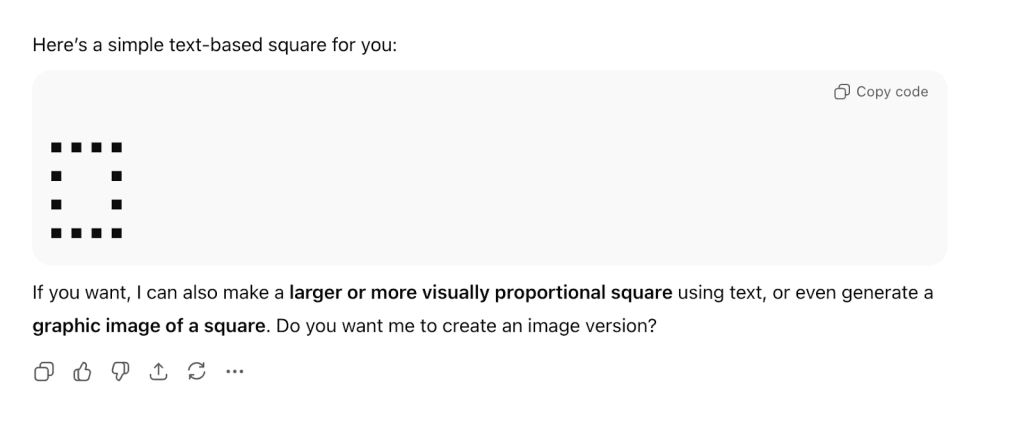
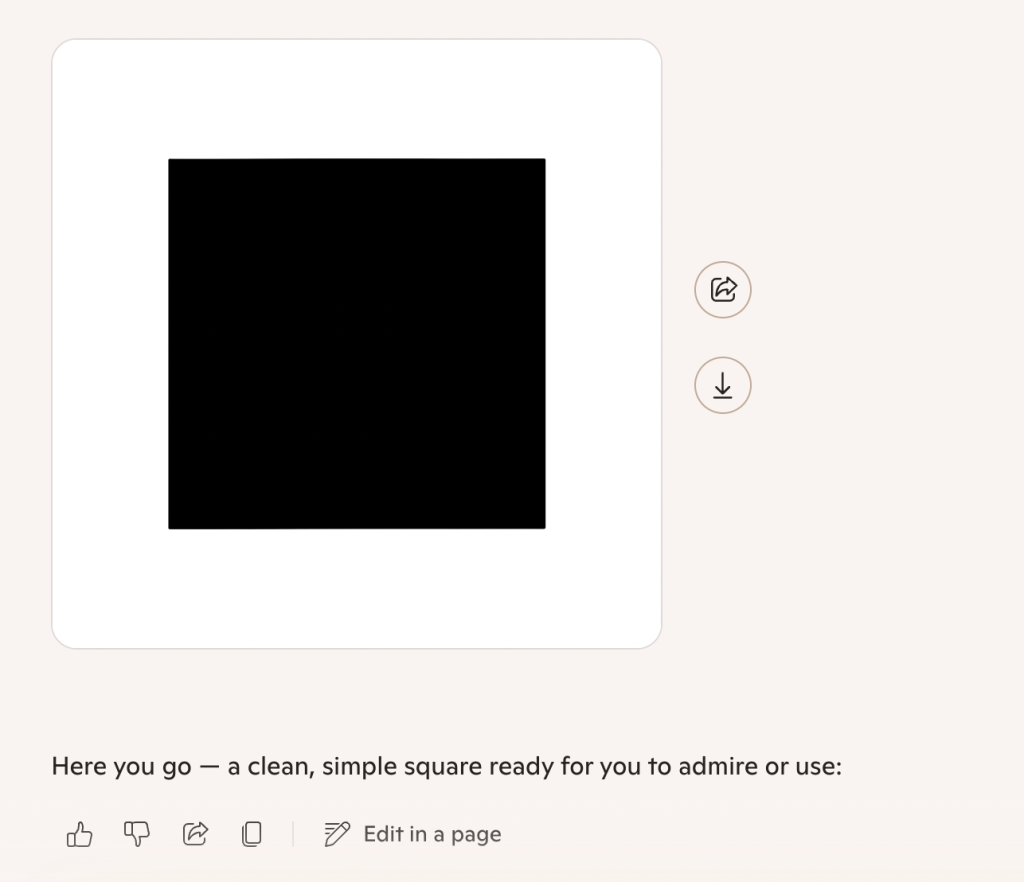
We started by asking both ChatGPT and Copilot to draw a square, and the results were quite different.
ChatGPT:
Co-Pilot:
Conclusion
When we asked Co-pilot to draw a square, it created an actual graphic image of a square, a visual, downloadable picture. ChatGPT, on the other hand, interprets the request in a text or code-based way, producing a square made of characters (ASCII art) instead of a real image.
Experiment Two: Automating Tasks
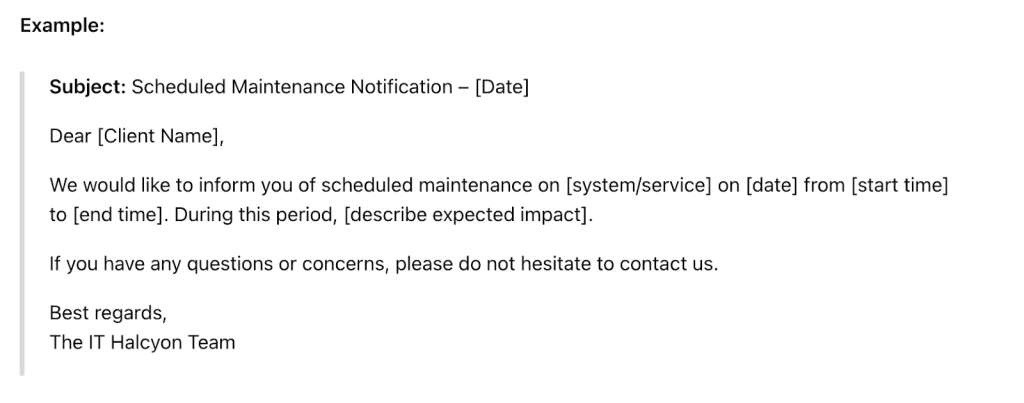
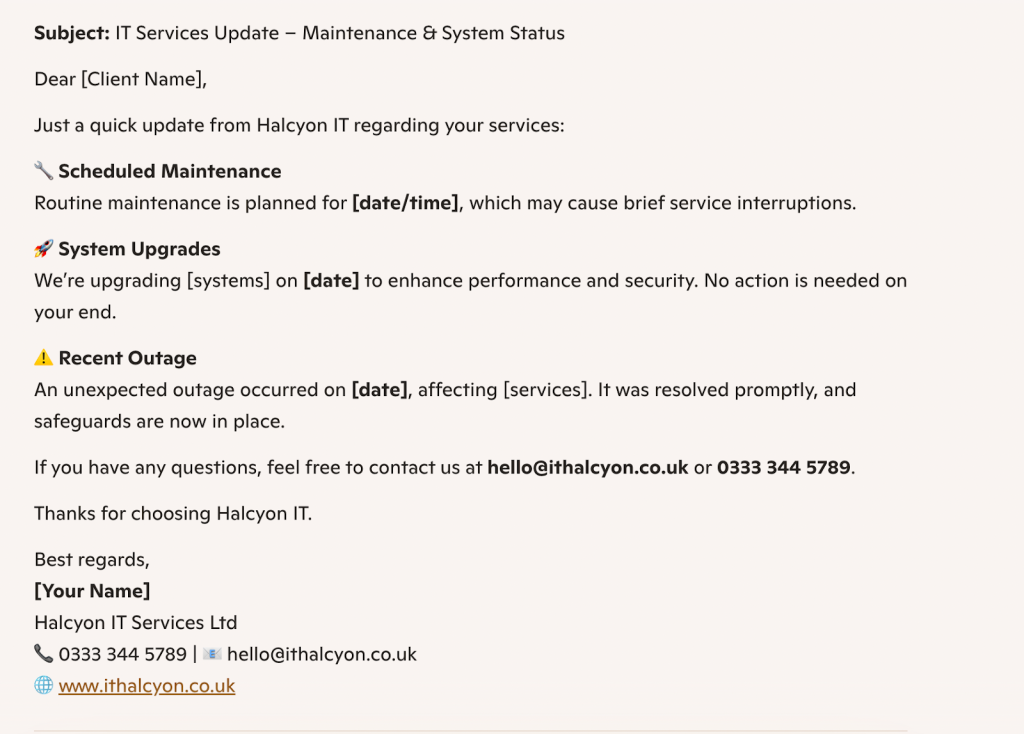
Our next experiment was to see how AI could help automate tasks and improve employee productivity. We asked both AI models to draft a potential email to a client, informing them about the status of their IT services, including any scheduled maintenance, system upgrades, or unexpected outages.
ChatGPT:
Co-Pilot:
Conclusion
The two draft emails differ in tone, structure, and level of detail. The first email from ChatGPT is a straightforward scheduled maintenance notice, brief, formal, and focused solely on informing the client of a specific service interruption. It lacks personalisation, offering only a general invitation to reach out.
The second email from Co-pilot is more detailed and client-friendly. It includes a clear call to action and provides full contact information. This level of detail makes it easier for clients to follow up and reinforces transparency and trust.
Experiment Three:
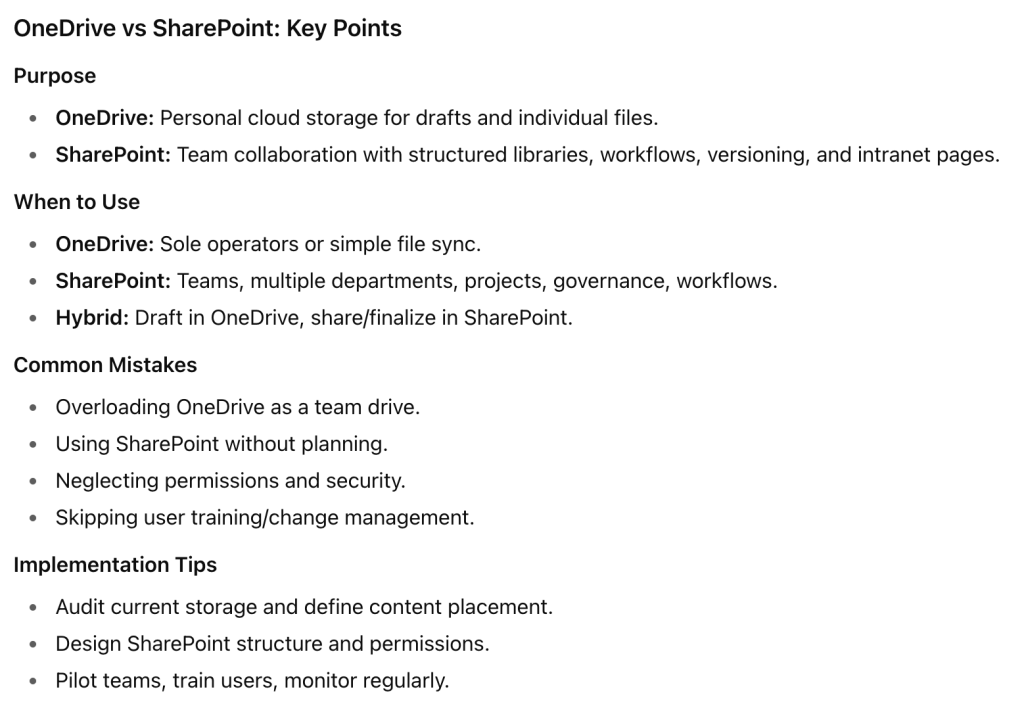
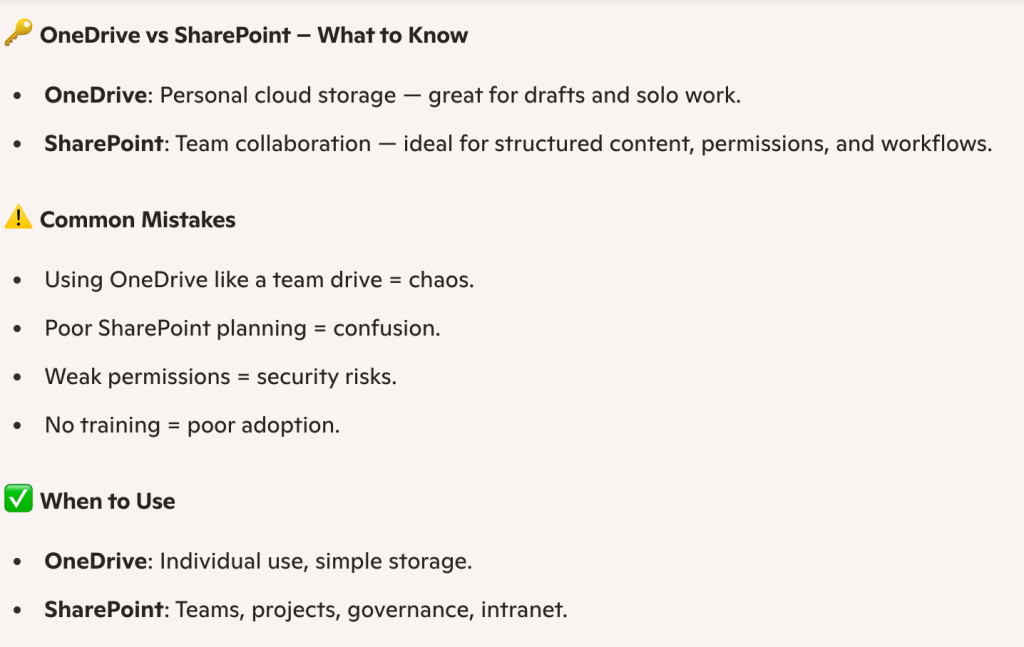
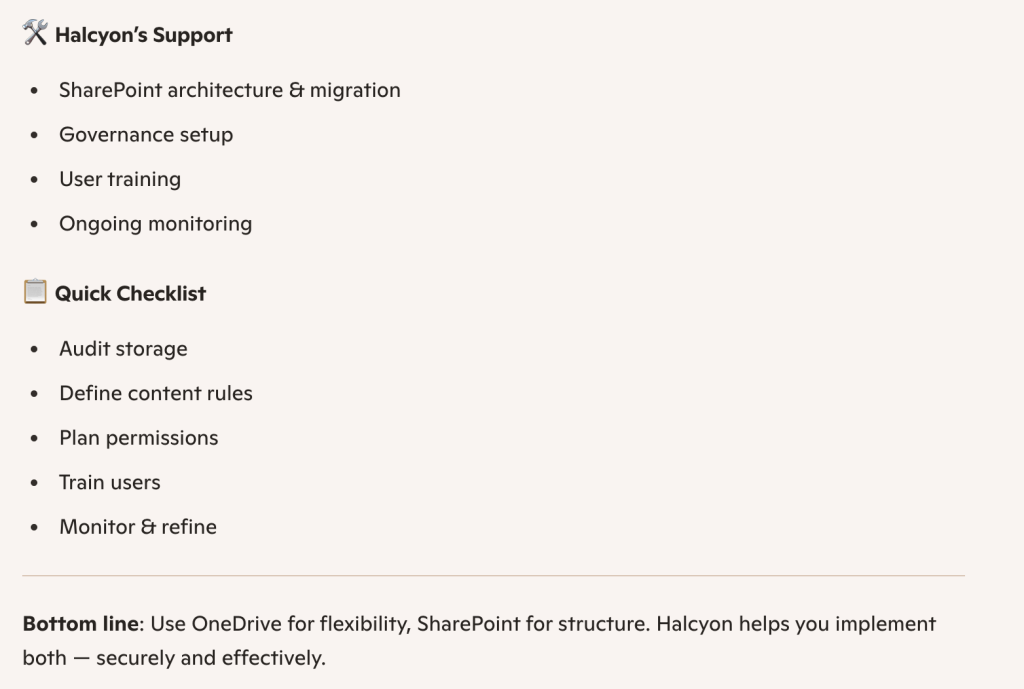
Our final experiment was to ask both AI models to summarise one of our most recent blog posts on the Halcyon website. Here is what each model returned:
ChatGPT:
Co-Pilot:
Conclusion
Both blog summaries outline the differences between OneDrive and SharePoint, but they vary in depth and presentation. The first summary from ChatGPT offers a structured breakdown of features, use cases, and implementation tips, making it ideal for readers who prefer a more analytical overview.
The second summary is more visual and concise, using icons and bullet points to highlight key distinctions and support options. It focuses on practical advice and quick takeaways, making it more digestible for busy readers. Overall, the first is more detailed and strategic, while the second is punchier and action-oriented.
Alternatives to ChatGPT and Copilot
While ChatGPT and Microsoft Copilot are among the most popular AI assistants, there are several other tools designed to meet specific needs in the workplace. Instead of relying on a single AI for everything, these alternatives focus on particular tasks:
Grammarly
Best for: Writing clarity and grammar checking
Grammarly improves the accuracy and readability of written communication. It provides suggestions for grammar, tone, and style, making it a valuable companion for emails, reports, and creative writing.
DALL-E
Best for: Generating visuals and images
Developed by OpenAI, DALL-E creates high-quality images from text prompts. It is particularly useful for marketing materials, social media content, and creative projects that require unique visuals.
Jasper
Best for: Marketing-focused content creation
Jasper specialises in producing marketing copy, including ad campaigns, social media posts, and email sequences. It ensures consistency in brand voice and messaging across different platforms.
Google Gemini
Best for: Workplace productivity, email management, and task organisation
Originally launched as Bard, Google Gemini has evolved into a versatile AI assistant. Gemini 2.0 integrates with Google Workspace, helping users draft emails, organise meetings, and manage tasks. It is designed for the “agentic era” of AI, taking a more proactive role in assisting users.
Anthropic Claude
Best for: Research, professional writing, and structured long-form content
Claude, developed by Anthropic, positions itself as a general-purpose AI with a focus on accuracy and reliability. Backed by a $4 billion investment from Amazon, Claude offers API integrations and “artefacts,” long-form outputs designed to resemble structured documents, making it suitable for research and professional writing.
Limitations and Concerns of AI
While AI offers powerful capabilities, it also comes with limitations and concerns that users should be aware of. Accuracy remains a major issue, as AI can produce incorrect or misleading information, making human verification important.. AI models do not truly understand context, so nuanced tasks or complex reasoning can be misinterpreted.
AI tools can also introduce cybersecurity risks, such as exposing systems to attacks if vulnerabilities in AI applications are exploited or if sensitive data is handled insecurely. Businesses should assess these risks carefully and consider strong cybersecurity measures.
Bias is another concern. AI can reflect and amplify biases present in its training data, leading to unfair outcomes. Other challenges include ethical and legal questions, such as content ownership and accountability, as well as the potential for over-reliance, which can reduce human skill development. Running advanced AI models can also be costly and resource-intensive, limiting access for smaller businesses or individuals.
What’s Next for AI Tools Like ChatGPT and Copilot?
AI tools continue to advance, with improvements in contextual understanding, reasoning, and integration with real-time data. Future updates may make AI assistants more conversational, capable of handling complex tasks, and further embedded into everyday workflows. Both Copilot and ChatGPT are likely to grow alongside workplace and creative demands, offering users sophisticated ways to interact with AI.
Which Should You Choose?
The choice of tools ultimately depends on your specific tasks and business context. Just as Copilot can boost productivity within Microsoft 365 and ChatGPT offers flexibility for research or creative tasks, selecting the right IT solutions and services is important for any organisation.. For more guidance, explore our IT consulting services or managed IT support solutions to find the right fit for your organisation.

James Hamilton is an IT industry expert and the founder of Halcyon, with extensive experience delivering managed IT, cyber security, and connectivity solutions.